Product Description
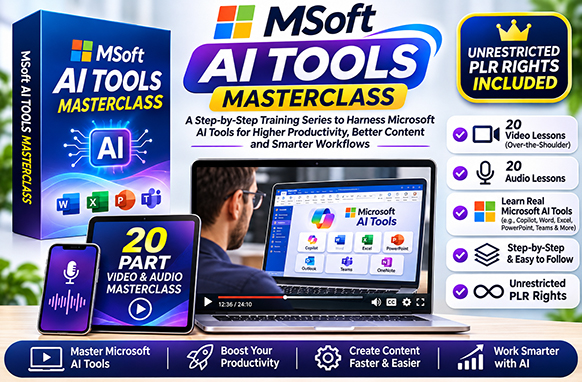
Discover how to harness the power of artificial intelligence with Microsoft AI Tools Masterclass, a comprehensive collection of 20 step-by-step video tutorials designed to help you work smarter, create content faster, and improve productivity using Microsoft's powerful AI tools!
Artificial intelligence is transforming the way businesses, marketers, content creators, and everyday users approach digital tasks.
With Microsoft AI Tools Masterclass, you'll discover how to use popular Microsoft AI-powered applications, including Copilot, Clipchamp, Designer, Outlook, Word, and PowerPoint.
From creating AI-generated videos and voiceovers to designing promotional graphics, summarising documents, drafting emails, and transforming written content into presentations, this practical training covers a wide range of useful AI applications.
Whether you're a beginner exploring artificial intelligence or an experienced user looking to expand your skills, these tutorials provide practical demonstrations and real-world examples.
Best of all, this complete training package includes Unrestricted Private Label Rights (PLR), allowing you to customise, rebrand, repurpose, and resell the content under your own brand!
What Will You Learn in Microsoft AI Tools Masterclass?
This comprehensive Microsoft AI training course introduces practical tools and techniques for creating content, improving productivity, and simplifying everyday digital tasks.
1. AI Video Creation with Microsoft Clipchamp
Discover how to create professional-looking videos using AI-powered features in Microsoft Clipchamp.
Learn how to:
- Create videos using AI-assisted tools.
- Use AI Auto Compose to simplify video production.
- Convert written text into spoken audio.
- Generate AI-powered voiceovers.
- Create video transcriptions and captions.
- Explore AI speaker coaching features.
- Prepare videos for marketing and presentations.
These tutorials introduce practical video creation techniques suitable for business promotions, educational content, and social media projects.
2. AI-Powered Graphic Design with Microsoft Designer
Explore how Microsoft Designer can help you create attractive graphics and promotional materials using artificial intelligence.
Discover how to:
- Generate AI images from text prompts.
- Create promotional graphics and visual content.
- Explore Microsoft Designer's AI-powered features.
- Use AI-generated imagery in creative projects.
- Create visual assets for digital marketing.
- Understand Microsoft Designer's terms of service.
- Work with Microsoft Designer Brand Kit features.
Whether you're creating social media graphics, advertising materials, or business visuals, these lessons introduce useful AI design techniques.
3. Microsoft Copilot for Email & Productivity
Learn how Microsoft Copilot can assist with everyday business communication and productivity tasks.
Explore practical applications such as:
- Summarising email conversations.
- Drafting emails in Microsoft Outlook.
- Improving written communication.
- Organising information more efficiently.
- Simplifying repetitive writing tasks.
- Using AI assistance within Microsoft applications.
These lessons demonstrate how AI can help streamline communication and reduce time spent on routine activities.
4. AI Writing, Summarising & Document Editing
Discover how Microsoft Copilot and AI-powered editing features can help you work with written content.
Learn how to:
- Use AI assistance in Microsoft Word.
- Summarise lengthy documents.
- Organise and simplify complex information.
- Explore AI-powered text editing.
- Transform information into structured summaries.
- Improve productivity when working with documents.
These practical demonstrations show how Microsoft AI tools can support writing, editing, and information management.
5. AI Presentations with Microsoft PowerPoint
Explore how artificial intelligence can assist with preparing and organising presentation content.
Discover how to:
- Summarise information for presentations.
- Transform written content into presentation material.
- Organise key ideas into structured slides.
- Use AI assistance to prepare presentation outlines.
- Improve presentation planning and productivity.
These techniques are useful for business presentations, training materials, educational projects, and professional communication.
What's Included in Microsoft AI Tools Masterclass?
This complete training package includes 20 instructional video tutorials, covering Microsoft AI applications, practical demonstrations, and real-world examples.
Complete 20-Part Video Training Series
- MSFTAI-TM – AI Video with MS Clipchamp – Introduction to AI-powered video creation.
- AI Video Auto Compose in MS Clipchamp – Explore automatic video composition.
- AI Text to Speech in MS Clipchamp – Convert written text into spoken audio.
- AI Video Transcriptions and Captions with MS Clipchamp – Create transcriptions and captions.
- AI Speaker Coach with MS Clipchamp – Explore AI-assisted speaking and presentation feedback.
- AI Speaker Coach in MS PowerPoint – Learn about speaker coaching in PowerPoint.
- Use AI with MS Designer for Promotional Content – Create marketing graphics using AI.
- Generate AI Images Using Microsoft Designer – Discover AI-powered image generation.
- MS Designer Brand Kit – Explore branding and design features.
- Terms of Service for MS Designer – Understand important usage considerations.
- Use Copilot to Summarise Emails – Explore AI-assisted email summaries.
- Drafting Emails in Outlook with Copilot – Learn how AI can assist with email writing.
- Live Example – AI Editor – Watch a practical AI editing demonstration.
- Live Example – Copilot in Word – Explore Microsoft Copilot within Word.
- Live Example – Summary and Designer – Discover practical summarising and design applications.
- Live Example – Turning Information Into Content – Explore AI-assisted information transformation.
- Live Example – Our Summary in PowerPoint – Learn how to use summarised content in presentations.
- Live Example and Limits – Explore practical examples and AI limitations.
- Live Example – Transforming Transcripts – Discover ways to work with video or audio transcripts.
- Microsoft Create and Conclusion – Explore Microsoft Create and review the training.
Additional MP3 Audio Training
Alongside the video tutorials, the package also includes an MP3 audio training folder.
These additional audio resources provide another convenient way to access and review the training material.
What Can Microsoft AI Tools Masterclass Be Used For?
This practical AI training package covers a variety of applications for business, marketing, content creation, and everyday productivity.
- AI Video Creation: Learn to produce videos using Microsoft Clipchamp.
- Text-to-Speech Conversion: Create AI-generated spoken audio from written content.
- Video Captions & Transcriptions: Explore automatic captioning and transcription tools.
- Graphic Design: Generate AI-powered graphics and promotional materials.
- Social Media Marketing: Create visual content for social media campaigns.
- Email Marketing: Use AI assistance to draft and improve business emails.
- Document Summarisation: Condense lengthy documents into useful summaries.
- Business Presentations: Organise information and prepare presentation content.
- Content Repurposing: Transform transcripts and written information into new content.
- Productivity Improvement: Explore AI tools that simplify repetitive tasks.
- Educational Content: Develop training materials and presentations using AI assistance.
- Digital Product Creation: Repurpose the training into branded educational products.
Who Is This Microsoft AI Training For?
Microsoft AI Tools Masterclass is suitable for individuals and businesses interested in learning how to use artificial intelligence more effectively.
- AI Beginners: Learn practical Microsoft AI applications through guided demonstrations.
- Online Entrepreneurs: Discover AI tools for marketing, content creation, and productivity.
- Digital Marketers: Explore AI-assisted video production, graphic design, and email writing.
- Content Creators: Learn how to generate videos, images, captions, and written content.
- Small Business Owners: Discover tools that can help simplify everyday business tasks.
- Freelancers: Expand your knowledge of AI-powered creative and productivity applications.
- Students & Educators: Explore AI-assisted research, writing, and presentation techniques.
- Office Professionals: Improve familiarity with Microsoft Copilot, Outlook, Word, and PowerPoint.
- PLR Resellers: Rebrand and resell the training as a digital educational product.
- Membership Website Owners: Add AI training resources to your digital content library.
What Will You Get with Your Download?
Your Microsoft AI Tools Masterclass package includes:
- 20 Step-by-Step Video Tutorials – Practical demonstrations of Microsoft AI tools and applications.
- MP4 Video Training Files – Video lessons covering AI-powered creative and productivity tools.
- MP3 Audio Training Resources – Additional audio materials included in the package.
- Microsoft Clipchamp Tutorials – AI video creation, text-to-speech, captions, and transcription training.
- Microsoft Designer Tutorials – AI image generation, promotional graphics, and branding features.
- Microsoft Copilot Training – Practical examples of AI-assisted writing and productivity.
- Microsoft Outlook Tutorials – Email drafting and summarisation demonstrations.
- Microsoft Word Training – AI editing, document summaries, and content organisation.
- Microsoft PowerPoint Tutorials – AI-assisted presentation preparation and speaker coaching.
- Real-World AI Examples – Practical demonstrations of Microsoft AI applications.
- Unrestricted Private Label Rights (PLR) – Edit, rebrand, repurpose, distribute, and resell the training content.
Why Choose Microsoft AI Tools Masterclass?
Artificial intelligence offers powerful opportunities to simplify everyday tasks, create digital content, and improve productivity.
However, learning how to use multiple AI applications can be overwhelming, especially when each platform offers different features and tools.
Microsoft AI Tools Masterclass brings together practical demonstrations of several Microsoft AI-powered applications in one convenient training package.
Instead of searching for separate tutorials covering Clipchamp, Designer, Copilot, Outlook, Word, and PowerPoint, you'll have access to a structured collection of lessons introducing their capabilities.
The training combines instructional videos with live demonstrations, helping users understand how these tools can be applied to real-world tasks.
From creating promotional videos and AI-generated images to preparing emails, summarising documents, and organising presentations, the course covers a broad range of useful skills.
Unrestricted Private Label Rights (PLR) Included
Your Training. Your Brand. Your Business.
Microsoft AI Tools Masterclass includes Unrestricted Private Label Rights, giving you the flexibility to customise, rebrand, and commercially distribute the training content.
With unrestricted PLR, you can:
- Rebrand the training under your own business name.
- Edit and customise the original content.
- Resell the complete video training package.
- Offer individual lessons as digital products.
- Repurpose the material into additional educational resources.
- Create AI training bundles and digital courses.
- Include the videos in paid membership websites.
- Offer the training as a promotional bonus.
- Use the content to develop additional AI learning resources.
- Give away or redistribute the training.
- Sell the package through your own digital product website.
- Keep 100% of your sales revenue without ongoing royalties.
Start Learning Microsoft AI Tools Today!
Whether you're looking to improve productivity, create AI-powered videos, design promotional graphics, or simplify everyday business tasks, Microsoft AI Tools Masterclass provides a practical introduction to Microsoft's growing collection of artificial intelligence applications.
With 20 instructional video tutorials, additional MP3 audio resources, and Unrestricted PLR Rights, this training package offers both valuable learning opportunities and flexible digital product possibilities.
Get Microsoft AI Tools Masterclass today and discover how to put Microsoft AI tools to work for your business, content creation, and everyday productivity!
- File Type zip file
- File Size 187.03 MB
- License Private Label Rights
- Product Files MP4, MP3
- Sale Tools no
- Date Added November 17, 2026
- Learn about this products licenses


